Answer: choose an MP3 in the browser tool, select English when the recording is English, choose SRT, run transcription, and inspect the timed cues before downloading or publishing them.
This page is about one job: turning a saved MP3 into time-coded SRT text. The examples are fresh local audio tests run through the live tool, so you can play each source and compare its wording with the returned cues.
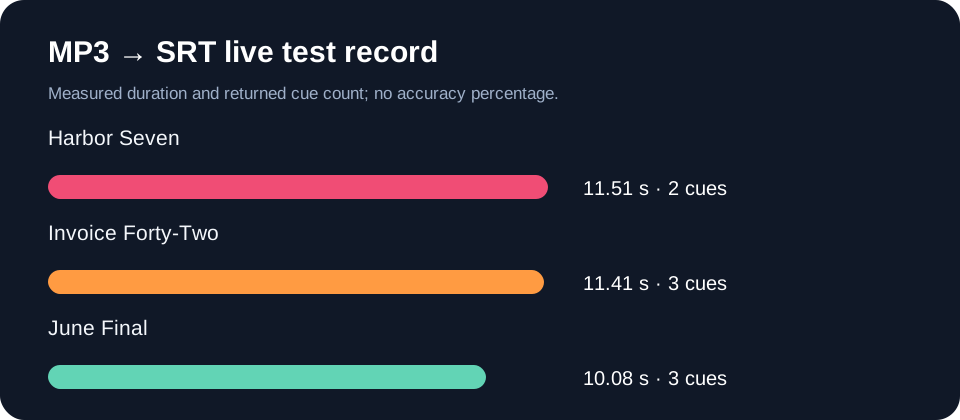
Measured duration and returned SRT cue count from the three tests below.
Three playable MP3 to SRT checks
These are synthetic English speech files created on this machine for reproducible checks. They are not recordings from a podcast, video channel, or other person. The source sentence is shown before the player; the SRT output is copied from the live tool after choosing English and SRT.
Harbor Seven: names and timing words
Source: The MP3 is called Harbor Seven. It starts with a short tone, then the first speaker says, check the subtitle cue at zero seconds. The last cue should end after the final word.
1
00:00:00,000 --> 00:00:08,720
The MP3 is called Hardware 7. It starts with a short tone, then the first speaker says check this off title queue at 0 seconds

2
00:00:08,759 --> 00:00:11,439
Last queue should end after the final word
Observed difference: “Harbor Seven” became “Hardware 7”; “subtitle cue” became “off title queue”; the final sentence was shortened into a second cue.
Invoice Forty-Two: file-format letters
Source: My export is named invoice forty-two. Keep the comma after the name. Then save one S R T file, not a V T T file. The second sentence starts at twelve seconds.
1
00:00:00,000 --> 00:00:04,000
My export is named in Voice 42. Keep the comma after

2
00:00:04,019 --> 00:00:08,000
The name, then say 1 SRT file not a VTT

3
00:00:08,019 --> 00:00:11,019
File,the second sentence starts at 12 seconds
Observed difference: “invoice forty-two” became “in Voice 42”; the spelled-out format names were compressed into “1 SRT” and “VTT”; the sentence split around the comma.
June Final: version names
Source: Please compare the file called June final two with June final ten. The first one is an MP3. The other one is a WAV. Leave both original recordings unchanged.
1
00:00:00,000 --> 00:00:04,000
Please compare the file called June Final to with June Final 10.

2
00:00:04,019 --> 00:00:06,019
The first one is an MP3,

3
00:00:06,040 --> 00:00:10,000
and another on Islov leave both original recordings unchanged
Observed difference: “final two” became “Final to”; “the other one is a WAV” became “and another on Islov”; the output retained timestamped cues but not the full source wording.
When an MP3 upload or SRT run fails
First check that the file plays locally and that its extension matches a supported audio format. If the browser cannot decode it, try a shorter copy or re-encode the audio, then run the shorter file. If the file plays but produces no readable text, check that it contains a spoken audio track rather than silence or music alone. The tool does not publish a universal fixed file-size promise: the practical limit depends on browser and device memory.
Questions people ask about MP3 to SRT
How do I turn an MP3 into an SRT?
Choose the MP3, select its spoken language, select SRT, run transcription, and review the returned cues against the recording before downloading them.
Why does my MP3 SRT contain the wrong words?
Names, numbers, format initials, music, and unclear speech can be misheard; replay each cue against the source before publishing.
What should I do when the MP3 will not upload?
Play it on the same device, confirm it has a readable audio track, then retry a shorter or re-encoded copy.
What these tests add
The useful check is not a blanket accuracy claim. Each test shows a playable source, intended wording, returned SRT cues, and the specific words that changed. That gives you a repeatable way to decide whether a subtitle file is ready for editing.